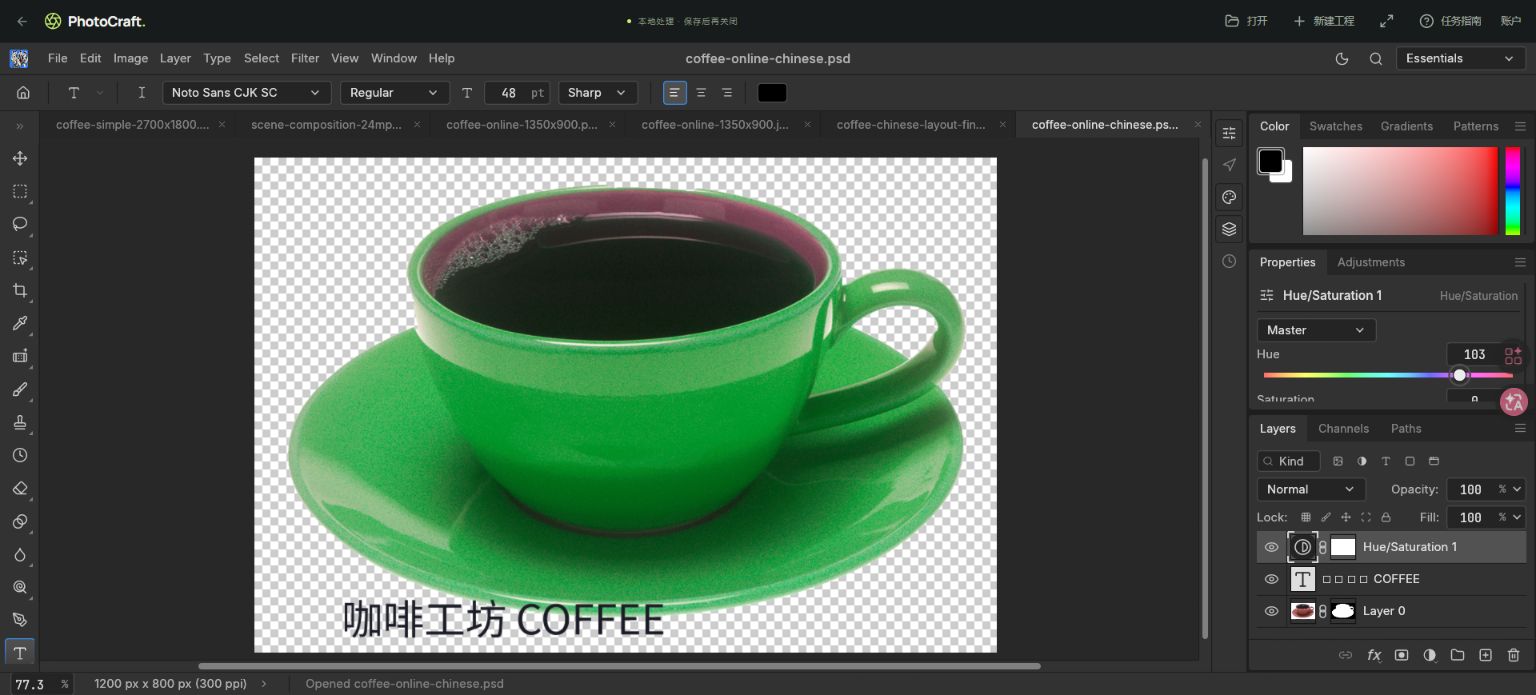
Our coffee PSD retained its text, mask and adjustment structure when saved and reopened in PhotoCraft. That is a verified PhotoCraft round trip, not proof of full Photoshop interoperability. Some smart-filter settings could not be re-edited after saving as PSD.
Compatibility results, with boundaries
| Test | Result | Scope |
|---|---|---|
| Text, layer mask, adjustment structure | Passed in the coffee fixture | Save and reopen in PhotoCraft |
| Chinese text rendering | Passed after selecting Noto Sans CJK SC | 1200 × 800 PNG and saved PSD |
| Smart Sharpen settings in PSD | Partial: visible result, lost editability | Local filter round-trip test |
| Large 6000 × 4000 layered PSD | Opened in the tested desktop environment | A sample result, not a memory guarantee |
| Adobe Photoshop round trip | Not tested | Do not assume parity |
A safer PSD workflow
- Keep the original PSD unchanged. Open a working copy through the website Open button and wait for the document to finish loading.
- Before editing, compare the layer list, visible result, font choice, mask edges and blend behavior against a reference image.
- Make a small change first, then File → Save. Check the actual downloaded PSD. Reopen it and inspect the change plus the important original structures.
- If editable filter parameters matter, prepare a native .pcraft project before that work. Copy Merged transfers pixels only; it does not migrate a layered PSD to a layered native project.
Download the tested layered example
This screenshot and downloadable PSD come from the same production acceptance test. It is a small reproducible example, not a representative test of every PSD feature. Complex smart objects, imported effects and every Photoshop version have not been verified.
When to use another workflow
For exact Adobe delivery, confirm the file in the receiving application before promising fidelity. Avoid overwriting the only original. Complex content-aware object removal also failed our test and should not be treated as a reliable one-click result.
Samples, licensing & test notes
Coffee source: Renee Comet / National Cancer Institute, public domain; our sample adds color changes, a mask and text. The native brush sample was made by PhotoCraft.pic and is free to reuse. Files and screenshots document specific tests, not a guarantee for every file or device.

Try it with a real sample.
If you get stuck, send a screenshot with your feedback. Your canvas is not automatically uploaded.